GoPlay11 Refer & Earn
Explore the referral dashboard, qualifying conditions and commission information.
What the Referral Screen Shows
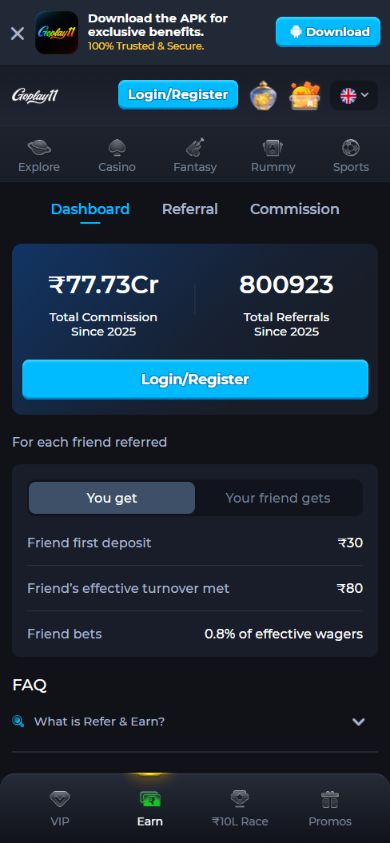
The supplied GoPlay11 screen shows Dashboard, Referral and Commission tabs, example totals, and a Login/Register button. Its displayed totals and amounts are a screenshot snapshot, not an offer to every visitor. Rewards depend on qualifying activity and the current terms shown in your account.
- Open the official platform and sign in to its Refer & Earn area.
- Check whether your account offers an invitation link, code or another sharing method.
- Read the current eligibility, location and qualifying-activity rules before inviting anyone.
- Tell an invited friend to review the current registration flow for any referral field and account requirements.
- Use the dashboard to check whether a qualifying reward was recorded, if the operator provides one.
Referral Rules
- Check when an invitation must be applied and whether it can be changed later.
- Check whether the operator restricts duplicate accounts or self-referrals.
- Reward amounts, caps, balance type and conditions may differ from the screenshot.
- Read the bonus and rewards guide before assuming a reward is withdrawable.
Share Responsibly
Only invite people you know who are adults and can afford to play. Don't spam groups, and don't promise anyone they will win money, because nobody can guarantee results in fantasy sports.
Refer & Earn FAQ
Is there a limit on referrals?
Some offers have a cap on rewards. Check the Refer & Earn screen for current limits.
My friend joined but I got nothing.
Check the current referral conditions and your dashboard status. If the expected reward is missing after the operator's stated time, use its support channel.